SKILL - Q&A with the clearxx Assistant Chat
Why plans go sideways
"Set up the new-client onboarding" sounds clear enough — until three different people build three different versions of it. One assumes the welcome email goes out automatically. Another assumes someone has to approve it first. A third never thought about what happens if the client's data lives in APP-XYZ instead of the clearxx workspace. The instruction was clear; the method behind it was not.
The clearxx Assistant faces the same problem. Without a repeatable way to work through this, you end up re-explaining the same context every time, important checks get skipped depending on who's asking, and the quality of the result depends entirely on how good the prompt was that day.
| Without a skill | With a skill |
|---|---|
| You repeat the same instructions in every chat | You write the working method once |
| Easy to forget an important check | The skill loads automatically when the task matches |
| Different users get different depth | Everyone works from the same playbook |
| Good prompting stays personal knowledge | Examples and edge cases are built in |
| Long-standing instructions create noise | You improve repeatability without removing judgement |
A skill doesn't guarantee every answer will be identical or correct — it improves the working method. Human review still matters.
A simple mental model
Five words carry most of the confusion, so it's worth pinning them down once, using a client-onboarding example:
| Prompt | Agent | Skill | Tool | Knowledge |
|---|---|---|---|---|
| "Send the onboarding email now." | The clearxx Assistant — the one coordinating the request | The onboarding playbook — how to work through this type of task | What the agent acts through — Email, Word Document, PowerPoint, Automated Scripts | Facts the agent may consult — your firm's policies, templates, past cases |
| What it is | |
|---|---|
| Prompt | What you want right now. |
| Agent | The coordinator. Interprets the request and manages the work — the clearxx Assistant. |
| Skill | How to do this type of work. Questions the plan in dependency order instead of guessing. |
| Tool | What the agent can act through. Email, PowerPoint, Word Document, Automated Scripts. |
| Knowledge | Facts the agent may look up — policies, project documents, references. |
What a skill actually is
A skill is a standardized way to give an agent new capability. In its simplest form, it's one Markdown file living in one folder.
| Part | What it covers |
|---|---|
| Name | A short identifier. Matches the parent folder. |
| Description | What the skill does and when it should activate — this is what makes it discoverable. |
| Instructions | The detailed working method: examples, formats, edge cases. |
| Optional resources | Scripts, references, templates, and assets, if the task needs them. |
A skill is a directory containing at least a file named SKILL.md. The
file opens with YAML frontmatter, then continues in plain Markdown:
---
name: qanda
description: Ask the user structured questions about a plan, decision,
  or task, in dependency order, until you both share the same
  understanding. Use when the user already knows the outcome they want
  but hasn't yet resolved the choices standing between them and it.
---

# Q&A

Question the user until you reach a shared understanding...
The agent discovers skills through progressive disclosure — it doesn't load everything at once:
- The agent first sees every skill's name and description.
- If the task matches, it loads the full
SKILL.mdinstructions. - Supporting references or assets are read only when actually needed.
- Scripts run only if included, supported, and permitted.
Rounds, not a questionnaire
Most advice about writing better prompts tells you to add more detail up front. The Q&A skill does the opposite: it assumes you can't know the detail yet, because half your decisions depend on decisions you haven't made.
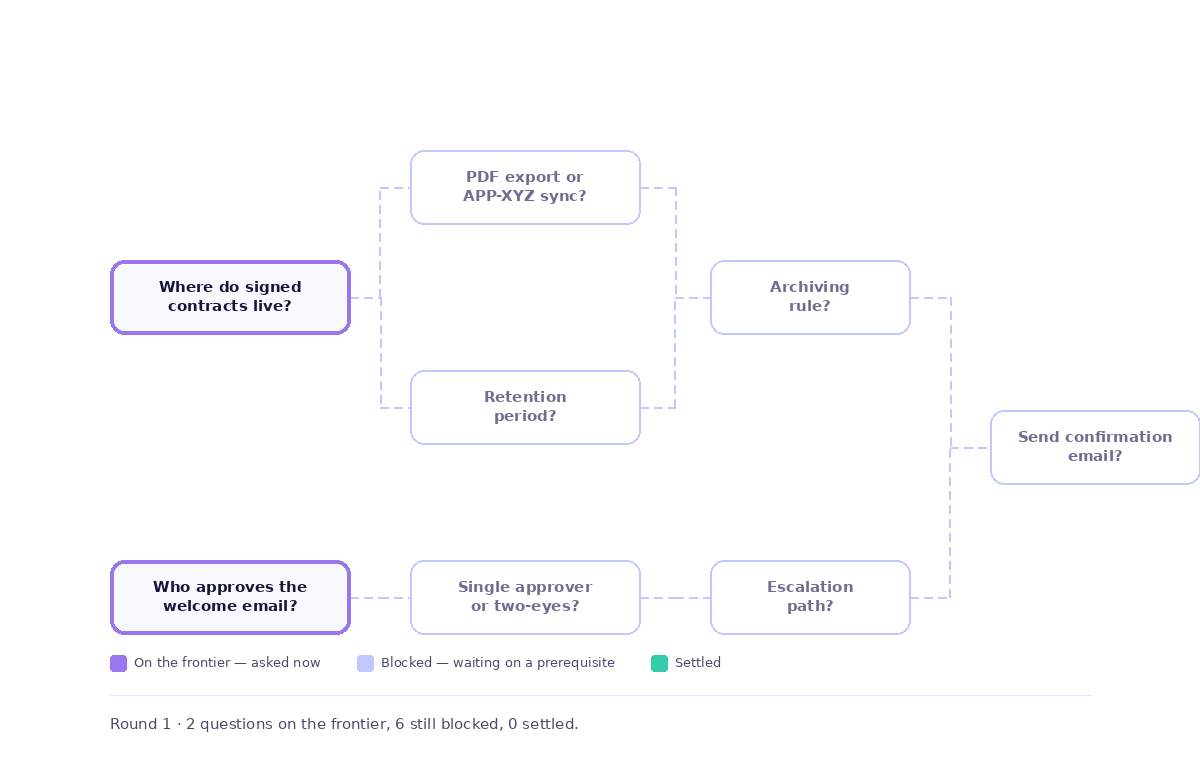
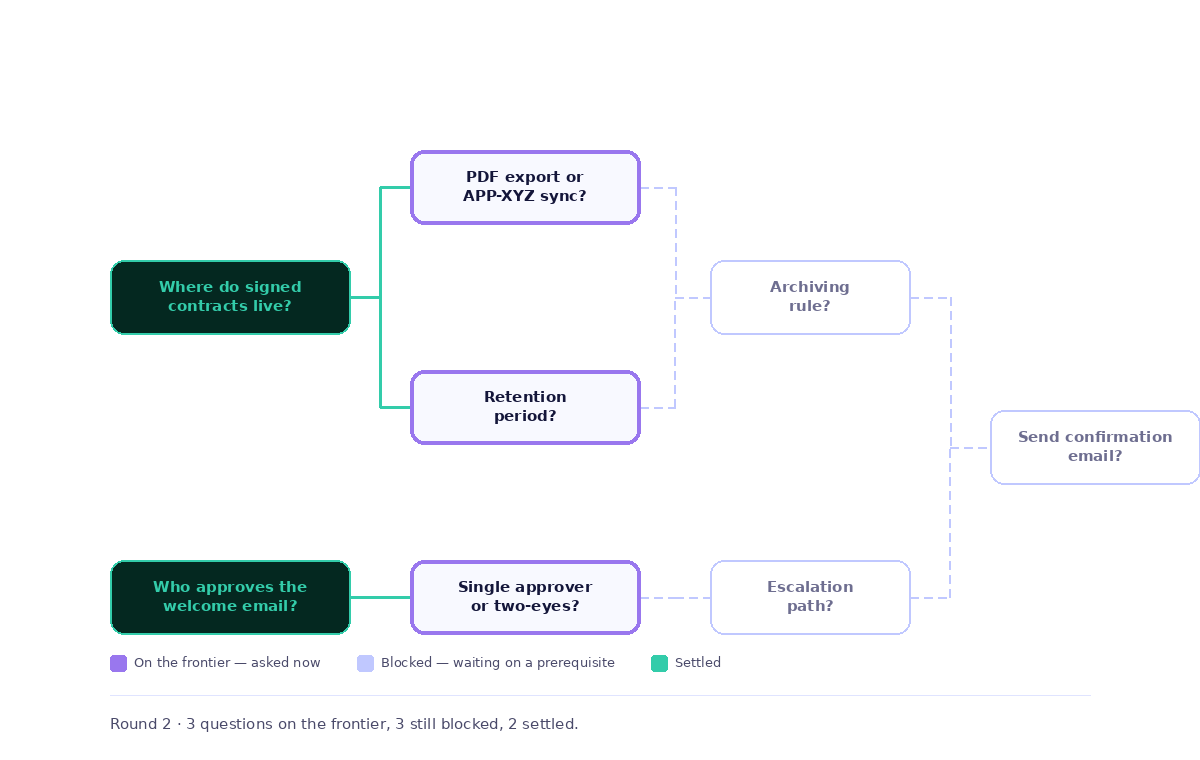
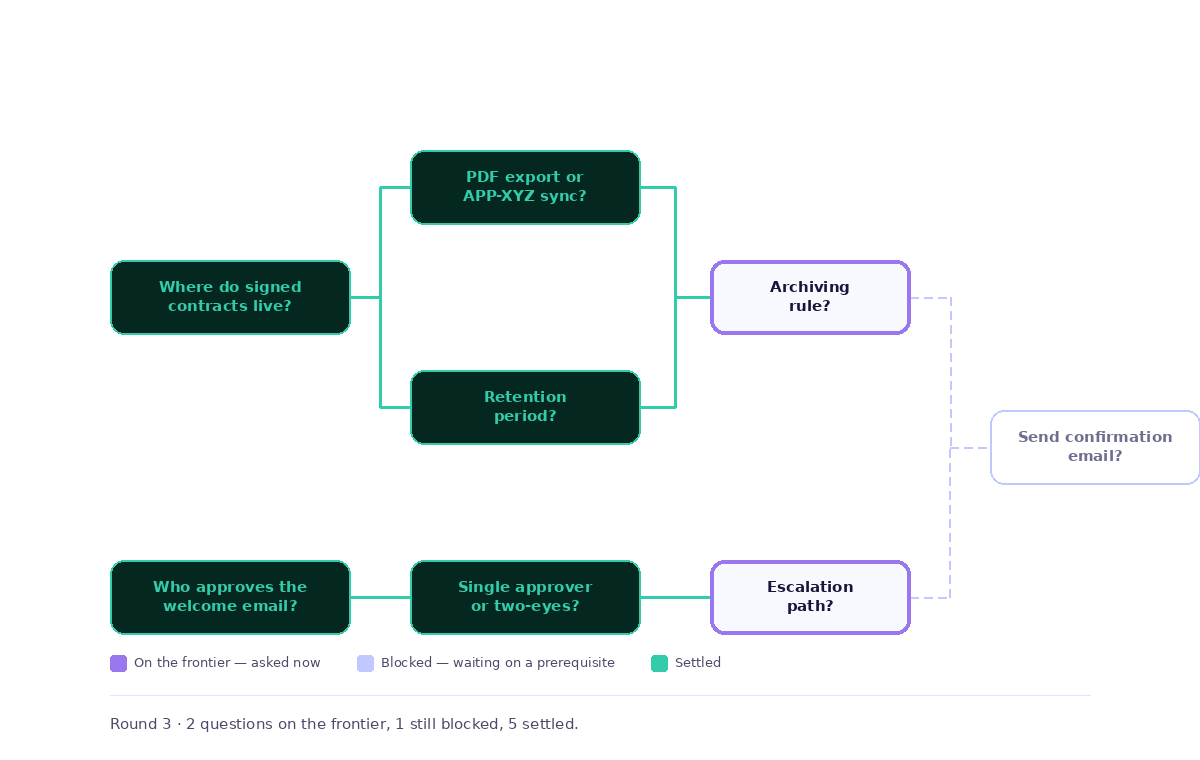
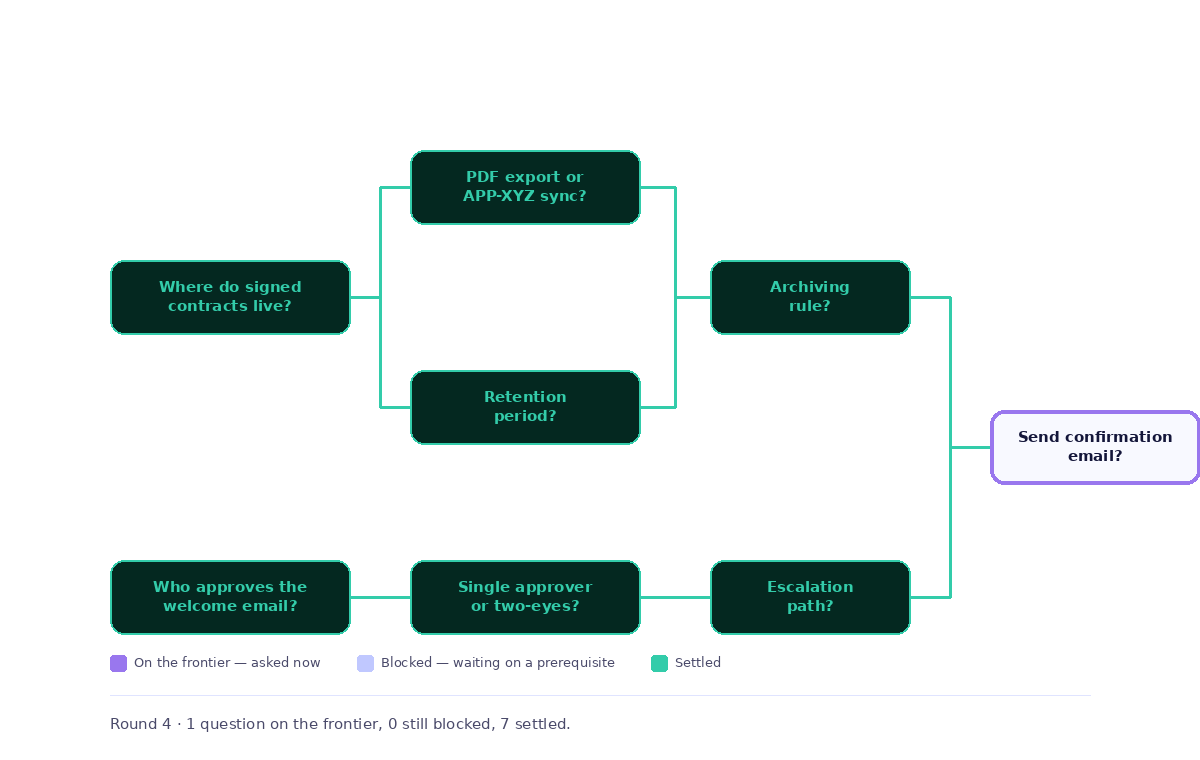
So it maps the task as a tree and works it in rounds. The frontier is every question whose prerequisites are already settled — the ones that can be asked right now without guessing at an answer nobody has given yet. The skill asks the whole frontier at once, numbered, each with a recommended answer. You answer; settled choices push the frontier outward and unblock whatever was waiting on them.
Below is the actual four-round session from the worked example later in this article — a clearxx customer automating new-client onboarding. Two threads are shown: where signed contracts live, and who has to approve the welcome email before it goes out.
Round 1 — both root questions are on the frontier; everything below them is still blocked.
Round 2 — the roots are settled, which unblocks their children.
Round 3 — one more layer resolves, down to a single blocked node.
Round 4 — the frontier reaches the final question. Once this is answered, the tree is fully settled.
Two more rules do a lot of the work. Finding facts is the agent's job, not yours. If a question can be answered by reading a document or checking a workspace file, the agent goes and reads it instead of asking you. And the session doesn't act until you confirm — it ends with agreement, not with a finished document appearing out of nowhere.
The Q&A skill, in full
This is the entire skill. Copy it, adapt it, disagree with it — it's Markdown.
---
name: qanda
description: Ask the user structured questions about a plan, decision,
  or task, in dependency order, until you both share the same
  understanding. Use when the user already knows the outcome they
  want but hasn't yet resolved the choices standing between them and
  it, or when the user uses a Q&A trigger phrase.
---

# Q&A

Question the user until you reach a shared understanding. Map this as
a **decision tree**: every choice branches into the choices that
depend on it.

Work the tree in **rounds**. The **frontier** is every question whose
prerequisites are already settled — the ones you can ask _now_ without
guessing at an answer you haven't heard yet. Ask the whole frontier in
one round: number each question and give your recommended answer.
Then wait for the user's answers before opening the next round.

Format each question like this:

---

**Q1 — <question title>**: <question body, may include options>

→ *Recommended:* <your suggested answer>

---

Each round, the user's answers reshape the tree — settled choices push
the frontier outward and unblock questions that depended on them.
Recompute the frontier and ask the next round. A question whose answer
depends on another question still open in this round belongs to a
_later_ round, not this one.

Finding facts is your job, never the user's. When a frontier question
needs a fact from the workspace (a file, a template, a connected
tool), go find it yourself — don't ask the user for anything you could
look up. Don't block the whole round on it: an unresolved lookup is
just one unsettled prerequisite, so only the questions downstream of
it wait. Ask the rest of the frontier now. The _decisions_ belong to
the user — put those to them and wait.

The session is done when the frontier is empty: every branch of the
tree has been visited, nothing left silently assumed. Do not produce
any output until the user confirms the understanding is complete.
Watch it work: before the skill
Nadine runs onboarding for a small HR consultancy on clearxx. She opens a fresh chat with the clearxx Assistant, no skill loaded:
Nadine: I want to automate onboarding for new clients — welcome email, an onboarding checklist, and a kickoff reminder.
clearxx Assistant: Here's a plan: when a new client is added, send a welcome email, generate an onboarding checklist, and schedule a reminder three days out. I'll set up the email template and a basic checklist document to start.
It sounds reasonable, and it is — but it quietly picked answers to several things nobody discussed: what actually triggers the workflow, where the client's data lives, whether anyone needs to approve the email before it sends, and what format the checklist should be in. Nadine won't find out those assumptions were wrong until the automation is already built the wrong way.
Watch it work: Round 1
This time Nadine pastes SKILL.md into the chat and adds one line:
Nadine: Read the skill and ask me about how to best set up automated onboarding for new HR clients.
clearxx Assistant:
Q1 — Trigger: What starts the workflow — a new entry in the CRM, a signed contract upload, or a manual click? → Recommended: signed contract upload — it's the one event that's always genuinely final.
Q2 — Where do signed contracts live? clearxx workspace, APP-XYZ, or an external CRM? → Recommended: clearxx workspace, if that's where you already store client files.
Q3 — Who approves the welcome email before it sends — nobody, one approver, or two-eyes? → Recommended: one approver, for the first few months.
Q4 — Checklist format: Word, PDF, or PowerPoint? → Recommended: Word — easiest for you to edit per client.
Q5 — Deadline: must the email go out same-day, or is next-business-day fine? → Recommended: next-business-day — gives the approver breathing room.
Nadine answers all five in one message, numbered:
Nadine: 1. signed contract upload. 2. clearxx workspace for now, but we might move to APP-XYZ later. 3. one approver — that's me for now. 4. Word. 5. next-business-day is fine.
Watch it work: Round 2
Two of Round 1's answers open new branches — where contracts live, and who approves. The other three (trigger, format, deadline) were leaf questions with nothing depending on them, so they're already settled.
clearxx Assistant: Round 2 — your answers on contract storage and approval each unlock one more layer.
Q6 — PDF export or APP-XYZ sync? Since contracts live in the clearxx workspace today but might move, should the checklist generator export a PDF copy, or build the APP-XYZ sync now so it's ready when you switch? → Recommended: PDF export now, APP-XYZ sync later — don't build for a migration that isn't scheduled yet.
Q7 — Retention period: how long should signed contracts be kept in the workspace before archiving? → Recommended: 10 years, matching standard German retention requirements for business correspondence — worth confirming with your Steuerberater.
Q8 — Single approver or two-eyes, specifically: does the approval step need a second reviewer once you're not the only consultant doing this? → Recommended: single approver for now, with a note to revisit once the team grows.
Nadine: 6. PDF export. 7. good catch, I'll confirm with our tax advisor, use 10 years as the placeholder. 8. single approver, agreed.
Watch it work: closing the session
clearxx Assistant: Round 3 — two questions left, one per branch.
Q9 — Archiving rule: once the retention period passes, should contracts be deleted automatically or flagged for your manual review? → Recommended: flagged for review — safer than automatic deletion of client documents.
Q10 — Escalation path: if the approver doesn't act within 24 hours, what happens — auto-send, or a reminder to the approver? → Recommended: a reminder, not auto-send. Skipping approval defeats the point of having one.
Nadine: 9. flagged for review, agreed. 10. reminder, agreed.
clearxx Assistant: Round 4 — last one, and it only exists because both branches are now settled.
Q11 — Send confirmation email: once everything above is in place, should the client also get an automatic confirmation once their checklist is generated, or does that come later as a separate step? → Recommended: include it now — it's the same email tool, no extra build cost.
Nadine: Yes, include it now. That's everything — go ahead.
The frontier is empty. Every branch has an answer, nothing was silently assumed, and only now does the skill move to producing something.
Watch it work: the output
clearxx Assistant: Both files are ready.
Automation Build Spec — the trigger, storage, approval, retention, and escalation rules from this session, written up as a build document for the Automated Script.
Onboarding Checklist (Word) — a starter template with placeholders for client name, kickoff date, and the documents checklist, ready for the Automated Script to fill in per client.
Two artifacts, both traceable back to a specific answer in the transcript — not to an assumption nobody signed off on.
Install it where you work
Save the skill as SKILL.md, then use it in the clearxx Assistant chat.
Save it once, reuse it every time. Keep the file on your computer. Add it to the chat (or to a Folder), then open the file and flip the switch at the top right of the preview, so that it reads Using Entire Document. By default the Assistant only gets pieces of a file, and parts of the skill could be missing. Do not add the skill to a Knowledge, which is meant for searching large collections, not for instructions.
Add the content via copy-paste. Open the skill file, or wherever you have the text, select all, and paste the full text directly into the clearxx Assistant chat input field, then say what you want the Q&A session to be about. This always gives the Assistant the complete skill.
Warnings:
- Keep skills under roughly 300 words. A simple skill is a more reliable skill.
- Read every line before using a skill you didn't write yourself. Security risks are real, especially in skills that include scripts.
Try it yourself
Load your new Q&A Skill into the clearxx Assistant Chat. Then copy one of the statements below into the chat text field. Go through the whole process and see what the outcome is.
Simple
Use the Q&A skill to stress-test my idea for a monthly client
knowledge-sharing session.
Real plan
Run a Q&A session on this onboarding plan called
"client-onboarding-draft.docx".
Time-boxed
Use the Q&A skill, but limit each round to the three highest-risk
open decisions. After each round, show what's settled and what's
still open.
For a team session
Use the Q&A skill. I want to run a 30-minute team session introducing
this to non-technical colleagues. Stress-test my session plan. Don't
produce the final material until we agree the tree is complete.
When to reach for it
You know the outcome you want. You don't yet know what you don't know, or which decisions block which. If both halves are true, run a Q&A session.
| Good fit | Why |
|---|---|
| "We're onboarding a new HR client next week. I know the checklist has to go out, but I haven't thought through the approval step or the retention rule." | A settled goal, an unsettled path — exactly what the tree is for. |
| "I need to turn this messy client-intake call into a build spec that doesn't block halfway through." | The dependency-resolving is the point. Run the session first, generate the spec from the resolved decisions. |
When not to
The most common mistake is reaching for it too early. A Q&A session stress-tests a plan; it can't invent one for you.
| Too early | Why |
|---|---|
| "What could we automate to improve client retention?" | You're still generating options, not choosing between them. There's no tree yet, so the questions will feel arbitrary. Diverge first — brainstorm, sketch a few ideas — then run the session on the option you picked. |
| "How should the onboarding email feel?" | Questions about tone and feel can't be resolved by talking through a tree. Draft something rough, look at it, then run the session on what's still unresolved. |
| Too big / not needed | Why |
|---|---|
| "Q&A me on our entire client-management system rebuild." | Quality drops as the session fills up the context. Split it into pieces small enough to finish in one sitting. |
| "I already know every answer, I just need it written up." | Skip straight to asking for the document. Running a Q&A session here would just be a slow way to dictate what you already decided. |
Tips from actually using it
- Answer fast. Every question comes with a recommendation. "Yes to all, except Q3 — one approver, not two" is a complete answer. Accepting recommendations is what keeps this quick.
- "You pick, and tell me the trade-off" is a legitimate answer. You don't need an opinion on everything — you do need to notice which ones you should have an opinion on.
- Push back on a bad question. If something feels premature or built on a wrong assumption, say so. That reshapes the tree — the mechanism working as intended, not failing.
- Watch for the question you hadn't considered. That's the actual return on running the session. If a whole round goes by without one, the scope was probably too familiar to be worth it.
- Ask for the decision list before moving on. "Summarise what's settled" gives you a checkpoint you can hand to someone else.
- Generate the output in the same session. Don't start a fresh chat — the resolved decisions are the context. Ask for the spec, the template, the email draft, all from the same transcript.
- Run it once, generate several things. One session can produce a build spec, a client-facing document, and a summary for a colleague. The decisions don't care what shape the output takes.
- Use it outside automation work. Process changes, hiring checklists, client proposals — anywhere a plan exists and the dependencies are still murky.
FAQ
Is a skill the same as a prompt template? No. A prompt template is usually pasted in manually for one request. A skill is a reusable package a compatible agent can discover and load automatically when the task matches.
Is a skill a tool? No. A tool gives access to an action — Email, Word, an automated script. A skill provides a working method, and may tell the agent which tools to use along the way.
Does SKILL.md require coding?
No. A simple skill is plain Markdown with YAML frontmatter, like the
Q&A skill above. More advanced skills can include scripts, but this
one doesn't need any.
Will every tool handle the skill file the same way? The file format is portable, but installation and discovery details vary by tool. Check the specific setup for the agent you're using.
Can a skill guarantee compliance? No. A skill can describe a compliant working method, but enforcement — permissions, approvals, access controls — belongs outside the skill itself.
Can running a Q&A session get annoying? Yes, if it's used on every small decision. Save it for consequential plans, set a stopping point, and narrow the frontier when time is tight.
Using skills you find elsewhere
Plenty of good skills already exist publicly — you don't have to write every one from scratch. Worth browsing:
- agentskills.io — an open directory of agent skills
- github.com/mattpocock/skills — a public skills repository
- skills.sh — a searchable skills catalogue
- skills.sh — wayfinder example
- Microsoft Copilot Studio — Skills overview
Any skill you find this way works the same on clearxx: open it, select all, and paste the full text into the clearxx Assistant chat.